Indoor playground digital waiver: step-by-step guide

An indoor playground digital waiver is the rules-and-responsibility form a parent or guardian signs on their phone for every child in their care. It works best when tied to online ticket sales: the family pays, gets the signing link in the confirmation email and signs before arriving, so reception only has to check who has signed.
What it should include and how to tell it is set up well
It replaces the paper form parents used to fill in at the desk. It usually covers play rules, acceptance of the risks of the activity and the details of the responsible adult and the children they bring. Other permissions, such as photo consent, belong in a separate document. The benefit over paper is not just convenience: you have a record of who signed, when and which version of the text they accepted.
At an indoor playground one adult often arrives with two or three children, so the system needs to meet four criteria:
- One signature per family: the adult signs for every child they bring, without filling in the form once per child.
- A copy for the signer: a PDF the family receives by email and can keep.
- Version control: if you change the wording, you know which version each person accepted.
- Linked to the booking: reception can see whether that ticket has a signature or is missing one.
Step by step: selling tickets online with phone signing
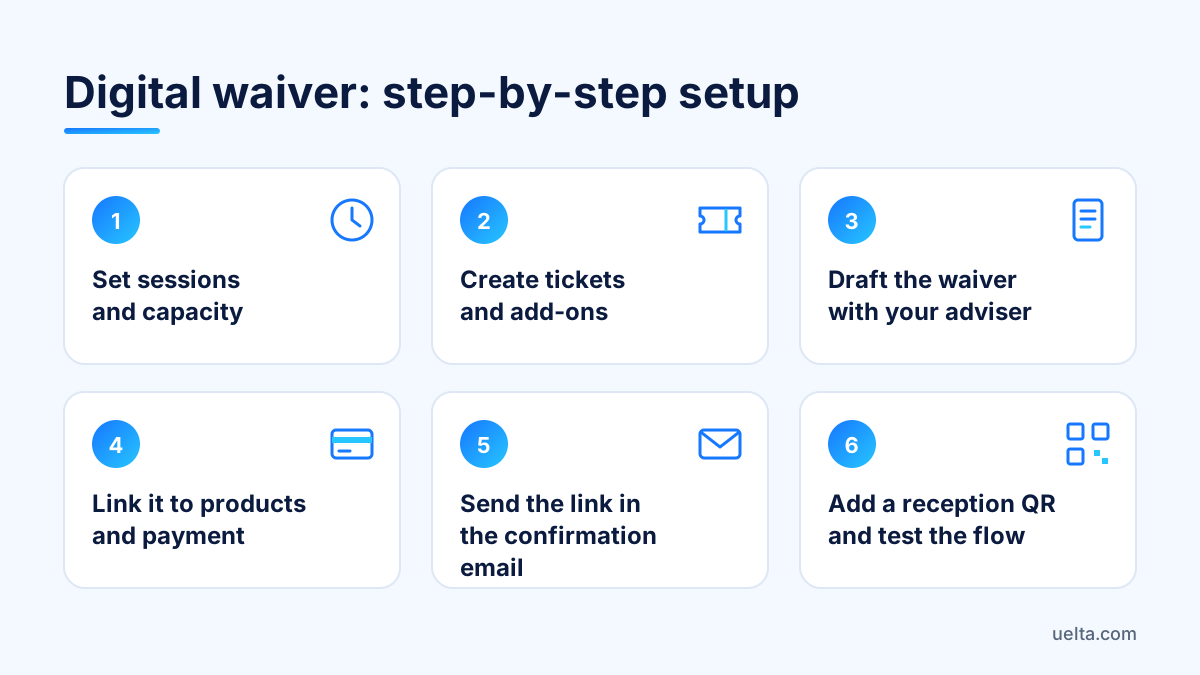
- Set sessions and capacity. Decide how long each slot lasts, how many children fit per session and whether accompanying adults count towards capacity. Skip this and online sales will overfill the play frame at peak times.
- Create your products. Child ticket per session, toddler ticket if you offer one, accompanying adult and add-ons such as grip socks or snacks, each with its price and VAT.
- Draft the waiver with your adviser. Rules, risks, the data you collect and what you use it for. Keep photo consent in a separate document that is never a condition of entry.
- Attach the waiver to the products that need it. A child ticket requires it; a standalone snack does not.
- Connect payment. A booking should only be confirmed once payment is complete, so you never hold places for people who do not pay.
- Send the waiver in the confirmation email. The best moment to sign is straight after paying, while the parent still has the phone in hand.
- Put a QR code at reception for late signers. Some families will always arrive unsigned: let them sign in the queue, not at the till.
- Test the whole flow. Make a test booking with two children, sign, check the PDF and confirm reception shows it as signed.
If you also sell birthday parties, the practical approach is for each invited family to sign for their child from the party invitation itself, so the organiser does not have to chase anyone. That is how birthday parties in Uelta work.
Indoor playground digital waiver and GDPR
Signing on a phone does not exempt you from data protection rules; if anything, because everything is recorded, it forces you to get them right. These are the practical checks:
- Who signs for the child. The age at which a child can consent on their own to online data processing varies by country: 13 in the UK, 14 in Spain under the LOPDGDD. Below that age, a parent or legal guardian consents. At an indoor playground, in practice the responsible adult always signs.
- Clear information before signing. Families must know who processes the data, for what purpose, how long it is kept and how to exercise their rights.
- Only the data you need. A child's name and date of birth are usually enough to check ages. If you ask about allergies or other health details, consider whether you really need them: health data has extra protection.
- Separate consents. Play rules on one side; photos and social media on the other, with their own tick box and a genuine option to say no.
- Easy withdrawal. Whoever signs must be able to withdraw consent without phoning or visiting the venue.
- Retention and access. Decide how long you keep waivers and which staff can see them. Not everyone on the team needs access to children's data.
- Where the data lives. Ask your provider which country the servers are in and what security measures apply.
Remember, too, that a waiver does not remove the venue's own safety obligations. Every case is different (ages, activities, local rules), so have the final wording reviewed by a legal adviser.
On the day: a reception desk without queues
The goal is for the desk to confirm, not to collect data. A routine that works:
- Find the booking by name or reference.
- Check that every child has a valid signature.
- If one is missing, point to the QR code and serve the next family while they sign.
- Mark the arrival and hand out wristbands.
Common situations: a grandparent bringing grandchildren, who signs as the responsible adult under the rule you have set for such cases; a family who visits weekly and should not have to re-sign every time if the text has not changed; a group of friends with a single adult, where every child must appear on a signature. Write these rules into a short procedure so the whole team acts the same way.
Common mistakes to avoid
- Using a signing tool that is separate from bookings: someone ends up cross-checking lists by hand at peak time.
- Asking for signatures only on arrival: it creates queues and rushed signing.
- Burying photo consent inside the rules with no way to refuse it.
- Changing the wording without version control and losing track of what each family accepted.
- Keeping old paper forms in a box with no retention period or access control.
- Collecting more data than you need, just in case.
Frequently asked questions
Is a finger signature on a phone legally valid?
Electronic signatures are legally recognised in the UK and the EU, and what matters is being able to show who signed, when and which text. Confirm with your adviser which type of signature suits your document.
Can an adult who is not the parent sign the waiver?
You can allow it if you define how they show they are responsible for the child during the visit. Agree the rule with your adviser and state it in the document.
Do families need to sign on every visit?
Not if you keep the signature and the wording has not changed. When you publish a new version, ask for a fresh signature.
Do parents need to install an app to sign?
It should not be necessary: the easiest option is signing in the phone's browser from a link or QR code.
How Uelta helps
Uelta puts selling and signing in a single flow. With online booking, families choose a day and a session with capacity control, add extras and pay; they immediately receive an email with the booking and a link to their forms. With digital waivers (an optional module), the guardian signs for all their children with one signature from a QR code or that link, receives a PDF copy with a link to withdraw consent, and Uelta records which version each person signed. Each product can require its own document, and there is no need to sign again while the same version is in force. When you check families in, the till shows who has signed and who has not. Data is hosted on servers in the EU, with role-based permissions and an activity log.
Build your own tickets-and-waiver flow and see it working: start your 7-day free trial.