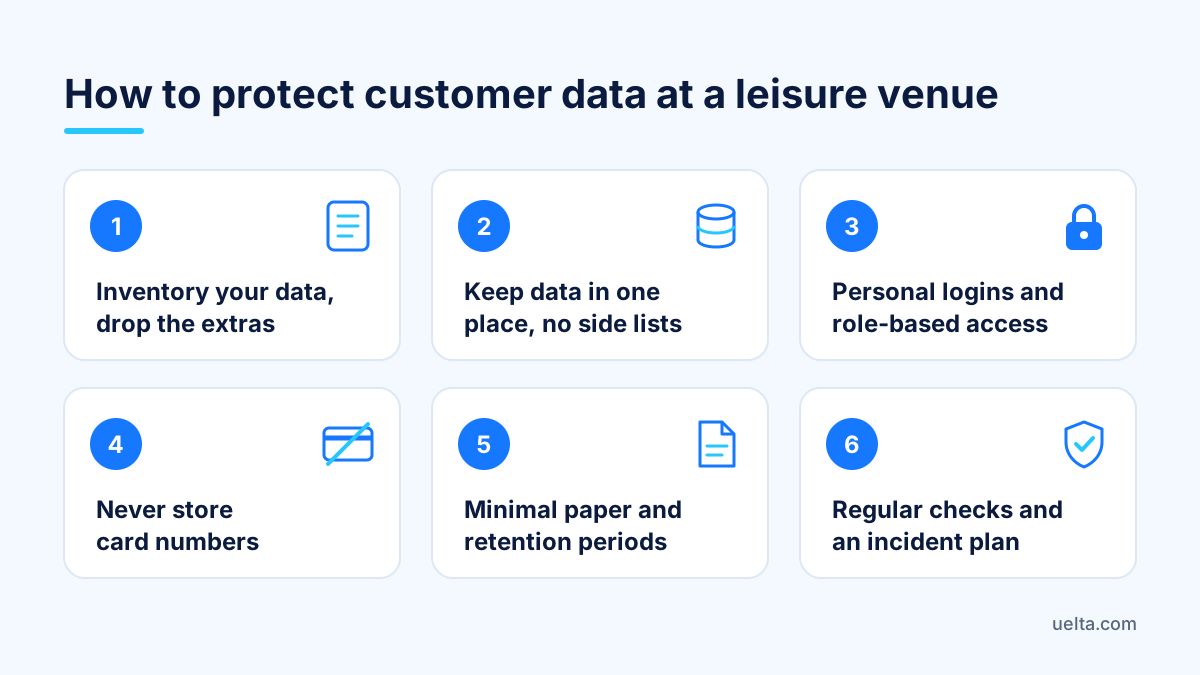
How to protect customer data at a leisure venue

To protect customer data at a leisure venue, you need to know exactly what you hold on each family, limit who can see it, never handle card numbers yourself and check backups and access on a regular basis. You do not need an IT department. You need a data inventory, clear rules for staff and a short, fixed review routine.
The front desk of a soft play centre or trampoline park handles children’s names, phone numbers, signatures, allergies and payments every day. This guide focuses on what you can do in the day-to-day running of the venue.
What family data you hold (and what you can drop)
Start with an honest inventory. In a spreadsheet, note on each row what you collect, where it is stored, who can see it and why you need it. In a typical children’s venue you will find:
- Contact details of the booking adult: name, email and phone number.
- Children’s details: name, age or date of birth, sometimes sock size.
- Allergies and intolerances for parties: this is health data and needs the greatest care.
- Signed documents: waivers, photo consent and permissions.
- Payments: receipts, refunds and till reports.
- Staff data: ID documents, bank details, contracts, payslips and clock-in records.
Then ask of every row: do I really need this? If you ask for a full date of birth but only use the age to allocate a play area, ask for the age. If you keep copies of parents’ ID “just in case”, stop. Data you never collect is data you cannot lose.
How to protect customer data at a leisure venue: 7 steps
- Keep data in one place. Get rid of parallel lists in spreadsheets, notebooks and WhatsApp groups. If a detail lives in five places, you have to protect it five times.
- Tell people when you collect. Every booking or waiver form should say who processes the data, for what purpose and how to exercise their rights. Have the wording checked by a legal adviser.
- Keep consents separate. Accepting the venue rules is not the same as agreeing to marketing emails or photos on social media. Ask for each separately and record who agreed to what, and when.
- Use personal logins. Every member of staff gets their own login or PIN. No shared password on a sticky note by the till.
- Keep paper to a minimum. The party sheet is printed for the party and shredded afterwards. It does not sit in the front desk tray.
- Set retention periods. Decide how long you keep each type of data and delete it when the time is up. The exact periods depend on your situation, so agree them with your adviser.
- Write an incident plan. Half a page on what to do if a tablet goes missing, an email goes to the wrong person or someone opens something they should not: who to tell, which passwords to change and what to record. GDPR gives you 72 hours to report certain breaches to the regulator, so have the plan ready before you need it.
Access and permissions: who sees what
Most data scares in leisure venues come not from sophisticated attacks but from badly assigned access. A floor host does not need customers’ purchase history, and whoever is on the till does not need to see payslips. Define three or four profiles and give each person only what their job requires:
- Front desk and till: today’s bookings, payments and waiver checks.
- Hosts and party staff: the sheet for their party, with names, sizes and allergies.
- Duty manager: customers, refunds, reports and the team at their venue.
- Management or accountant: contracts, payslips and employment data.
And three fixed rules:
- When someone leaves, their access goes the same day, not “when there is time”.
- Front desk tablets and the till are locked whenever they are left, even for a minute.
- Summer and Christmas seasonal staff are reviewed when the season ends and removed if they are not staying on.
Secure payments: never keep card details
The most important rule is also the simplest: your venue should never see or store card numbers. Online, customers type their card into the secure page of your bank’s payment gateway, not into a form of yours. At the desk, payments go through the card machine.
Put in writing what is not allowed, because on a busy Saturday these things happen with the best of intentions:
- Taking card details over the phone “to hold the party” and jotting them down on paper.
- Accepting photos of cards or full payment details by WhatsApp or email.
- Refunding to an account other than the one used to pay without the manager’s approval.
For phone bookings, send the link to your online shop and let the customer pay themselves. And keep an eye on refunds: several in a row by the same person are worth a quiet word.
Backups and regular checks
A backup is only useful if you know it exists and what it restores. Ask your software provider how often they back up and where their servers are, then look after what sits outside the system: documents on the office computer, scanned contracts and downloaded exports. Keep them somewhere with restricted access, never on a USB stick in a drawer. The rest is a short routine in the duty manager’s diary.
Every week (15 minutes)
- Check till discrepancies and refunds by member of staff.
- Look through the activity log for price changes, deletions or unusual edits.
- Make sure no party sheets or paper forms are lying around.
Every month
- Review the user list: does everyone with access still work for you?
- Check that people who unsubscribed are no longer receiving campaigns.
- Open a test export and confirm it is complete.
Every year
- Update the data inventory and privacy wording with your adviser.
- Delete anything past its retention period.
- Walk the whole team through the incident plan.
Frequently asked questions
Are children’s allergies specially protected data?
Yes. Under GDPR, allergy information is health data, a special category. Collect it only for the specific party, show it only to those who need it and check with a legal adviser how to ask for consent.
Can I keep a customer’s card details to take the party balance later?
It is not a good idea to keep them yourself. Take the balance through your online shop or on the card machine on the day, so the card number never passes through your staff.
How long should I keep signed waivers?
It depends on how you use them and the legal periods that apply to you, so agree it with an adviser. What matters is choosing a period, writing it down and sticking to it.
What should I do if a front desk tablet goes missing?
Change the passwords of everyone who used it straight away, check the activity log and write down what happened. If families’ data may be at risk, ask your adviser whether you need to report it to the regulator.
How Uelta helps
Uelta brings bookings, waivers, parties and the till together in one place, so there is no need for parallel lists. Under security and GDPR you get daily backups, EU servers with an encrypted connection, role-based permissions, a log of who made each change and an unsubscribe link in every marketing email. For parties, allergies are flagged with a “!” next to the child’s name and the details are visible only to the venue and the organiser.
- Digital waivers: each signature is tied to its document version, with a PDF copy by email and a link to withdraw consent.
- Online payments: the card is entered on the Redsys page, never in Uelta.
- POS and till: each member of staff logs in with their own PIN and every sale shows who made it.
- Staff and HR: ID documents, bank details and salaries are stored encrypted and visible only to whoever manages staff.
See how it works with your own venue’s data: start your 7-day free trial.