Trampoline park incident log and maintenance guide

A trampoline park incident log is the single record where you note every accident, equipment fault or complaint with its date, area, what happened and how it was resolved. It helps you look after anyone who gets hurt, repair equipment in time and show later exactly what was done, by whom and when.
What a trampoline park incident log is and why it matters
Three kinds of event belong in the same place: injuries (a twisted ankle after a bad landing, two jumpers colliding, a knock against the frame), equipment faults (a spring pad that has slipped, a torn net, a worn jumping mat, broken blocks in the foam pit) and complaints or behaviour (a group ignoring the rules, a family unhappy about how they were treated or how long they waited).
With everything in one log and clear categories, patterns appear that would otherwise be lost: the same bed coming up again and again, more knocks in the last Saturday session, or a zone the marshal cannot see properly. The log also lets you answer your insurer, a parent or an inspector with facts, and it stops the evening shift finding a zone taped off with nobody knowing why.
What to record in every incident report
A good report takes a few minutes to complete. These fields work for most parks:
- Exact date and time it happened, not when it was written up.
- Area and equipment: number your beds, walkways and attractions so that 'bed 7 in the free jump zone' means the same thing to everyone.
- Person involved: name, approximate age, responsible adult if it is a child, and whether a signed waiver was on file.
- What happened, as facts only: 'landed on her side and complained about her ankle'. No opinions, no blame.
- First aid given and by whom.
- Notifications: whether emergency services were called, whether the family was told, and at what time.
- Witnesses: the marshal on that zone and, if they agree, other customers.
- Photos of the area and the equipment involved.
- Equipment status: still in use or closed.
- Reviewing manager and closing date.
If your form has twenty mandatory fields, nobody will fill it in properly at six o'clock on a packed Saturday. Make only the essentials mandatory: time, area, what happened, first aid and equipment status.
Step by step: from the incident to closing the case
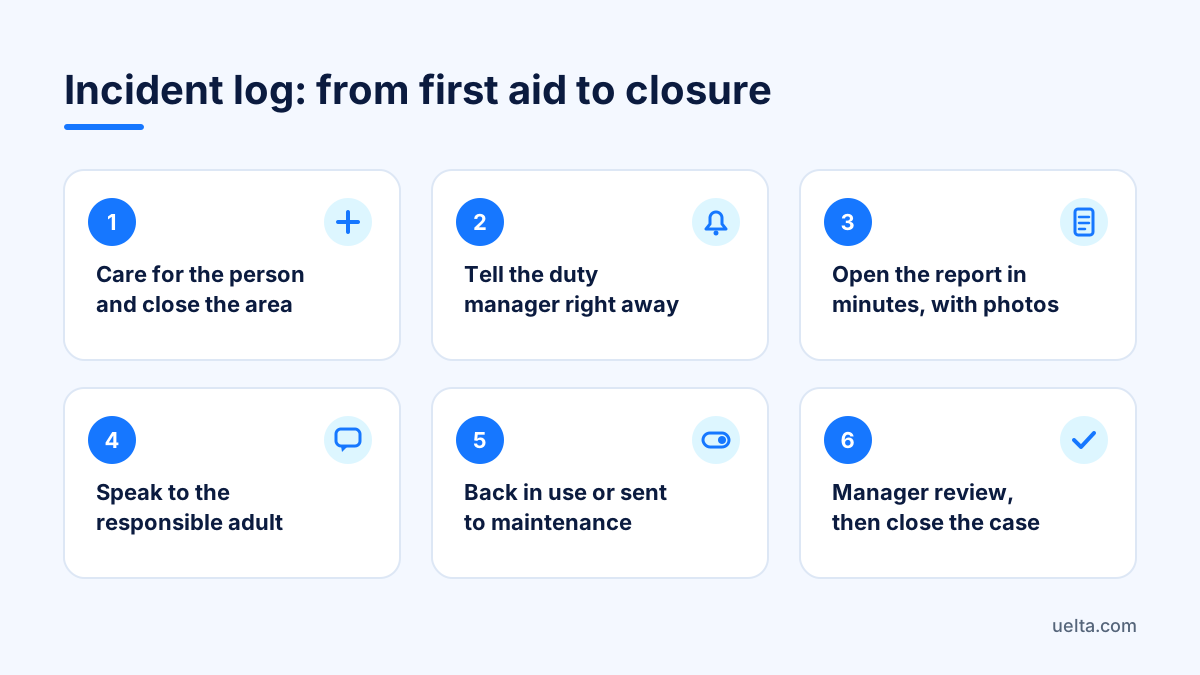
- Care and protect. The person comes first. Then close the area with tape or a marshal standing in front so nobody keeps jumping there.
- Tell the duty manager. They should know before the family reaches reception.
- Open the report within minutes. Details fade quickly, and two versions of the same event damage trust.
- Take photos of the equipment and the area as they were left.
- Speak to the responsible adult. Explain what was done and, if your procedure includes it, ask them to sign the report to confirm they have been informed.
- Decide the equipment status: back in use after a check, or sent to maintenance.
- Manager review. Approve the report, add a note and decide whether your insurer needs to be told.
- Close. A short summary of the outcome and any compensation offered.
Be careful with the data: an injury is health information, and when a child is involved it deserves even more care. Limit who can see full reports and check with your legal adviser and your insurer what you must report, to whom, and how long to keep the records.
Trampoline maintenance: checks and repairs with a history
Many injuries start with a pad that moved or a slack net that nobody noted. That is why a pre-opening check, always with the same list, pays off:
- Jumping mats free of cuts, open seams or worn patches.
- Spring pads in place and secured along the whole perimeter.
- Side and divider nets taut and without holes.
- Foam pit with enough blocks and no objects inside.
- Landing mats and walkways with no gaps between sections.
- Safety rules visible in every zone.
- First aid kit complete and where it should be.
When something breaks, the repair always follows the same path: request, acceptance, approval, repair, sign-off and closure. With before and after photos, materials and cost recorded, you will see which equipment causes the most trouble and when replacing beats repairing again. One simple rule: no closed zone reopens without sign-off from someone other than the person who fixed it. The trampoline parks page shows how this fits alongside sessions, waivers and wristbands.
Common mistakes when keeping the log
- A notebook in a drawer. It gets wet, goes missing and nobody can search it.
- Reports written days later, from memory and without photos.
- Opinions instead of facts: 'the boy was out of control' helps nobody; 'he was jumping on bed 4 with two other children' does.
- Skipping minor knocks. Small bumps repeated in the same spot warn of a bigger problem.
- Reopening a zone without a check because there is a queue.
- Never reading the log. If it is only written, it loses half its value.
Set aside half an hour each month to go through reports by zone, time slot and type. That tells you where to place an extra marshal, which rule to stress in the safety briefing, or which session needs a lower capacity.
Frequently asked questions
Does a signed waiver replace the incident report?
No. The waiver records that the customer accepted the rules before jumping; the report records what happened and what you did next. You need both, and how much weight each carries in a claim is something to check with your legal adviser.
How long should incident reports be kept?
It depends on the rules that apply to you and on your policy terms, so confirm it with your legal adviser and your insurer. In the meantime, do not delete reports and keep access restricted.
Can I photograph an injured child?
The safest approach is to photograph the area and the equipment, not the person. If you need an image of the injury, ask the responsible adult for permission and restrict who can see it.
Who should close an incident?
The floor or duty manager, ideally someone other than the person who opened it. That gives a second pair of eyes before the case is marked as resolved.
How Uelta helps
With Uelta's internal operations you manage incidents and maintenance per venue, with a full history:
- Incident reports with photos, statuses with notes, manager approval, customer signature and PDF.
- Maintenance in six steps, from request to closure, with photos, costs, materials and a conversation thread.
- Customer complaints logged in seconds, with an owner, compensation, closure and statistics on what keeps recurring.
- Roles and permissions so each person only sees and does what they need, with an activity log.
With digital waivers, each jumper signs on their phone, a parent signs for their children, and the till shows on arrival who has signed and who has not. Try it for 7 days with every feature, modules included: start your free trial.