Working-time records for leisure venues in Spain
If you run a trampoline park, an indoor playground or any leisure venue with employees in Spain, you must record the start and end time of each person’s working day, every day, and keep those records for four years. The simplest way to comply without paper sheets or a time clock on the wall is to let each employee clock in from their phone, with the time set by the system and a history that cannot be tampered with. Here is what the law asks for, where leisure venues usually slip up and how to organise it properly.
What the working-time record requires
Recording working time has been mandatory in Spain since May 2019, when Royal Decree-law 8/2019 added a new paragraph to article 34 of the Workers’ Statute. In short, the employer must:
- Record every day the exact start and end time of each person’s working day, without affecting any flexible hours you have agreed.
- Organise the system through a collective agreement, a company agreement or, failing that, an employer decision after consulting staff representatives.
- Keep the records for four years and make them available to employees, their representatives and the Labour Inspectorate.
For part-time staff, working time is recorded day by day and totalled each month, and the employee must receive a summary of their hours with their payslip. Overtime has to be recorded too. European case law has added a key idea: the system must be objective, reliable and accessible. A sheet filled in from memory on Friday afternoon is unlikely to meet any of those three tests.
Failing to keep the record can be treated as a serious infringement during an inspection. Beyond the penalty, a good record also protects you: if someone ever claims unpaid hours, it is your best evidence.
Why it is harder in a leisure venue
In an office with fixed hours, clocking in is almost a formality. In a leisure venue, much less so:
- Split shifts and weekends: play staff who start at ten, stop at midday and come back for the afternoon birthday parties.
- Lots of part-time staff: students and weekend cover who also need their monthly summary.
- Days that run long: a party that finishes late or a school group that arrives behind schedule.
- Different roles: front desk, floor, cleaning and maintenance, and sometimes several venues.
- High turnover: new people every season who need to learn the system in five minutes.
That is why the old methods fall short. Paper gets lost, is filled in after the fact and nobody checks it until an inspection arrives. A time clock on the wall forces everyone through one spot, handles breaks badly and, with several venues, multiplies the problem by each site.
What a good clock-in system looks like
Before choosing a tool, check that it meets these conditions:
- The system sets the time, not the employee and not the clock on their phone.
- In, break and out in one or two taps, from a phone or the front desk computer.
- Nothing is deleted: mistakes are fixed by adding or voiding entries, always with a reason and a record of who did it.
- Everyone sees their own records and managers see their team, venue by venue.
- Easy export for your accountant or to hand over during an inspection.
- Four-year retention without relying on someone keeping folders in a cupboard.
Clocking in from the phone, step by step
This is what a normal day looks like when the working-time record lives in the same panel your team already uses:
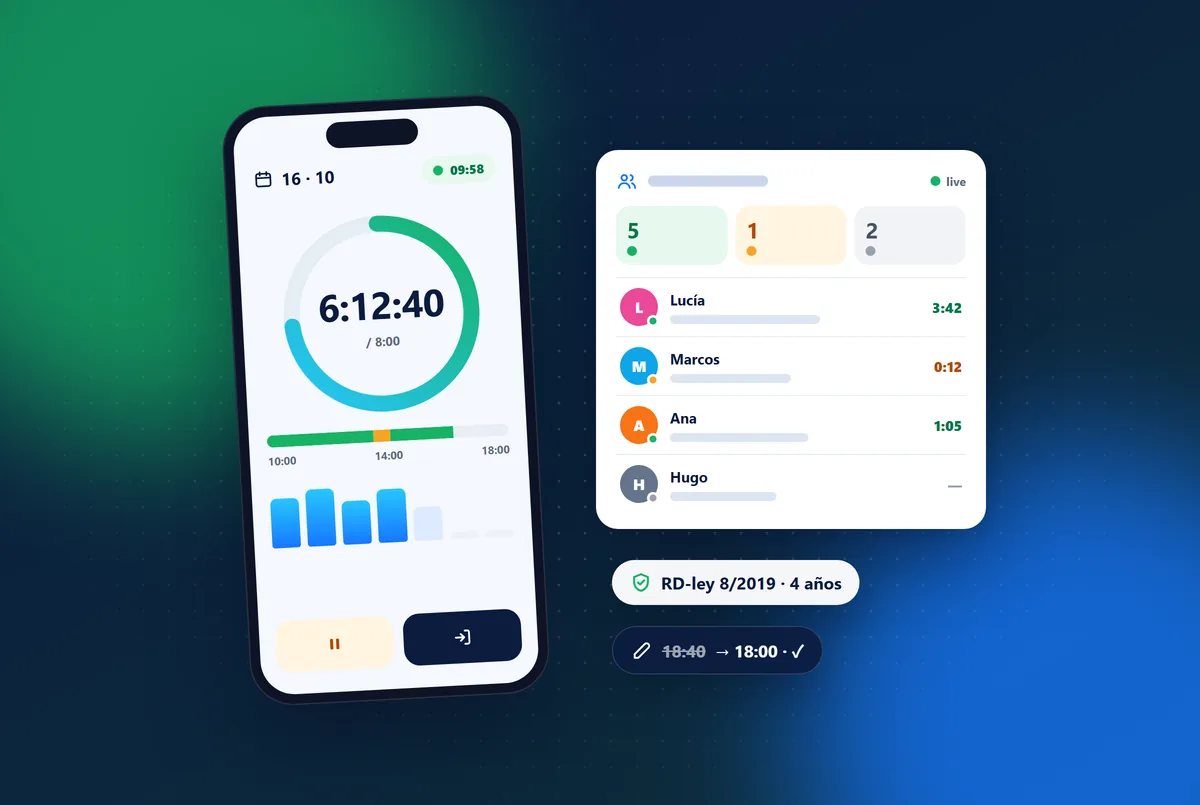
- On arrival, the team member opens the panel on their phone and taps “In”. A green indicator at the top shows the time worked today.
- On a break, they tap “Break”, the indicator turns amber, and “Back” when they return.
- At the end of the shift, they tap “Out”. They can check their day, their week and their expected hours whenever they like.
- The venue manager sees on one screen who is working, who is on a break and who has not arrived, without phoning anyone.
What if someone forgets to clock out? It is the most common slip. A good system never invents the time: it flags the day as having no clock-out, alerts the manager and lets them complete it with a reason, so the record stays reliable.
Corrections without losing trust
Mistakes will happen: someone clocks in late because their phone was in the locker, or a party ran half an hour over. What matters is how they are corrected. If anyone can change a time and the original disappears, the record loses its value in front of the Inspectorate and in front of your own team.
Best practice is that only managers can correct entries, that every change requires a reason and that the previous value is kept, together with who changed it and when. The person concerned should be notified. That way, if a disagreement ever comes up, you can explain every entry.
Several venues and an accountant
If you run more than one site, every clock-in should be linked to the venue where it happened, and each manager should only see their own people. Head office, on the other hand, needs the full picture. At the end of the month, your accountant will appreciate a CSV by person and dates instead of photos of signed sheets.
It is also worth comparing hours worked with the hours in each person’s contract. It is the quickest way to spot overtime nobody wrote down, or shifts that fall short during the busy season.
How Uelta handles it
In Uelta, time tracking and clock-in is part of the Staff and HR feature, alongside staff records, contracts and holidays. Each person clocks in with their own account from a phone or computer browser, the server sets the time and the records are kept for four years. Corrections add or void entries with a reason, and the original entry stays crossed out in the history. If you run a group, every clock-in stores its venue and head office sees everything from the multi-venue view.
Frequently asked questions
Is a spreadsheet or a paper sheet enough?
The law does not impose a specific format, but the record must be reliable and available for four years. A sheet filled in afterwards that can be changed without a trace is hard to defend during an inspection.
Do breaks have to be recorded?
The legal minimum is the start and end time. Recording breaks as well lets you calculate actual working time, especially with split shifts, and avoids arguments.
Can employees see their own records?
Yes, and they should always be able to: the records must be available to each employee. With clock-in on the phone, everyone can check their day and their week whenever they want.
What about part-time staff?
Their working time is recorded day by day and totalled every month, and they must receive the summary of hours with their payslip. A system that adds up hours per person and period saves you doing it by hand.
Want to see how your team would clock in? Try Uelta free for 7 days with every feature included.