Booking software security: what to ask your provider
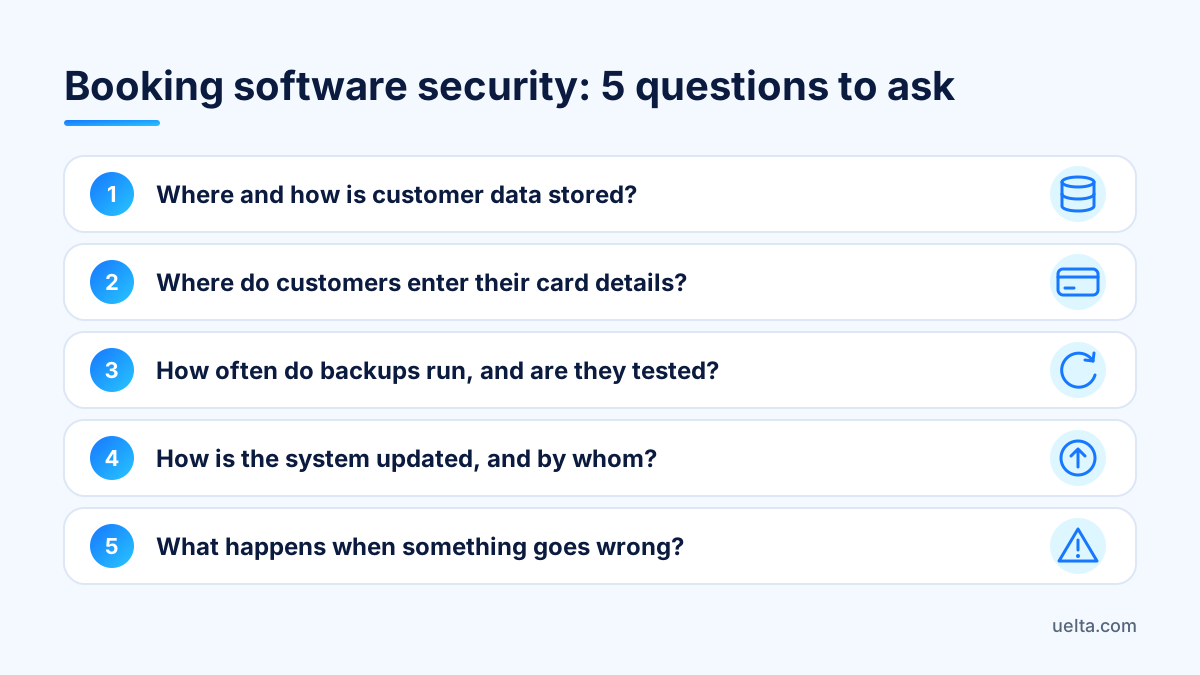
Booking software security comes down to five questions you can put to any provider: where and how customer data is stored, where card details are entered, how often backups run, how the system is updated and what happens when something goes wrong. If the answers are specific and the provider can show them to you in the dashboard, you are in good hands.
What your venue stores and why booking software security matters
A trampoline park, soft play centre or climbing gym does far more than sell tickets. Over time, almost everything sensitive about the business ends up in one system:
- Names, emails and phone numbers of families.
- Children’s details and the parent’s or guardian’s signature on the waiver.
- Allergies noted for party food.
- Purchase history, multi-visit passes and loyalty points.
- Staff data: ID documents, bank details, payslips and clock-in records.
Children’s data and allergies, which count as health data, are the most sensitive of all. If a former member of staff still has a login, or a party sheet is passed around on a channel you don’t control, the damage isn’t technical: it’s the trust of the families who book with you. That is why these questions belong before you sign, not after the first scare.
Customer data: where it lives and who can see it
These questions separate a serious answer from a vague ‘don’t worry, it’s all secure’:
- Which country are the servers in? For a venue in the European Union, data hosted in the EU makes GDPR much simpler to handle.
- Is everything encrypted in transit? The dashboard and the online shop should always run over an encrypted connection.
- Are there role-based permissions? Front-desk staff don’t need payslips, and party hosts don’t need to export the customer list.
- Is there an activity log? If someone deletes a booking or changes a price, you should be able to see who did it and when.
- How are consent and unsubscribes handled? Every marketing email needs an unsubscribe link; every signature needs the document version and a way to withdraw consent.
- If there’s an AI assistant, what does it answer with? It should use your venue’s own information (opening hours, rules, available slots) and pass anything it doesn’t know to a person.
- What happens to your data if you leave? How long it is kept, how you request an export and when it is deleted.
Don’t settle for a verbal answer: ask to see, in a demo, how a role is created, where the activity log lives and how a list is exported. For the legal side (children’s data, the data processing agreement, retention periods), check your specific case with a legal adviser.
Online payments: who handles the card and who holds the money
Many venue owners blur two separate questions: where the card number is typed and which account the money goes into.
- Where the card is entered. The safest set-up is for the customer to type it on the payment gateway’s own page, not in a form inside the booking software. That way the software never sees or stores card numbers.
- Where the money lands. With a virtual card terminal from your bank, payments go straight to you. If there’s an intermediary, get payout timings and fees in writing.
- When a booking is confirmed. Only once the gateway reports the payment; otherwise an abandoned checkout can hold spaces in a full session.
- Whether there’s a test mode. Test purchases that don’t count as sales let you check everything before real customers arrive.
- Accountability at the till. Each member of staff with their own PIN, so you know who took a payment, applied a discount or issued a refund.
A familiar scene: Saturday, the 5pm session is full and a parent insists they paid but has no confirmation. If the system only confirms bookings once the gateway reports the payment, you check the payment status and decide on facts, not under pressure from the queue. For how this works with a Redsys virtual terminal, see online payments.
Backups, updates and incident response
Backups
Ask how often backups run, whether they are automatic, how long they are kept and whether the provider has actually tested restoring them. A venue that trades every day needs daily backups at the very least: losing a Saturday afternoon of party bookings is already a serious problem.
Updates
Find out whether the software runs in the browser or has to be installed on every tablet and computer, who applies updates and whether you’re told about changes that affect how you work. Installed software that nobody updates is a risk that tends to go unnoticed.
Incidents
Get in writing the support channel, the real support hours and how you would be told about a problem affecting your data. Clear hours beat impossible availability. As data controller, you have your own notification duties under GDPR; your legal adviser can explain how they fit with the provider’s contract.
Keep your own plan B too: if the venue’s internet drops, take payments on the card machine, note arrivals on paper and enter everything once you’re back online.
Security checklist for your own venue
The provider covers half of security; the other half depends on how your team works.
- One login per person: no shared accounts like ‘frontdesk1’.
- Remove access on the day someone leaves, summer cover staff included.
- Minimum permissions: each role sees only what it needs for its shift.
- Unique passwords, never on a sticky note by the till.
- Printed party sheets with allergies are collected and shredded after the party.
- Lock the till and the cash drawer whenever you step away, even for a minute.
- Once a month, review the activity log and who has exported data.
- Request or download an export of your key data regularly.
Mistakes we see often: sending customer lists over WhatsApp, keeping exports on a USB stick that goes missing, leaving the old web agency with access and using the same password for the venue’s email and the booking dashboard.
Frequently asked questions
What should I ask about security before choosing booking software?
The essentials: where the servers are, whether there are role-based permissions and an activity log, where the card is entered, how often backups run and which support channel you can use during an incident.
Is it safe for customers to pay online when they book?
Yes, if the card is entered on the payment gateway’s page rather than in the booking software, and the booking is only confirmed once the gateway reports the payment.
Do I need a data processing agreement with my booking software provider?
Usually yes: if the provider processes your customers’ data on your behalf, GDPR expects a contract governing that processing. Check with your legal adviser what it should cover in your case.
What happens to my customer data if I switch booking software?
It depends on the provider. Before signing, ask how long data is kept after you leave, how you request an export and when it is permanently deleted.
How Uelta helps
Uelta hosts data on servers in the European Union with an encrypted connection, makes an automatic backup every day, and has role-based permissions and a log of who made each change. Staff ID documents, bank details and salaries are stored encrypted. It’s all summarised on Security and GDPR.
- With your Redsys virtual terminal, the card is entered on Redsys’s page, never in Uelta; money goes straight to your account and the booking is confirmed once Redsys reports the payment. Before taking real payments, you can try everything in test mode. Details in online payments.
- Digital waivers record which version each person signed, send a PDF copy and include a link to withdraw consent.
- At the till, each member of staff logs in with their own PIN and every sale shows who made it.
- Every marketing email carries an unsubscribe link, and clock-in records are never overwritten: each correction keeps who, when and why.
- It runs in the browser with nothing to install; support requests are raised as a ticket from the dashboard and answered by email. If you cancel, your data is kept for 30 days and you can request an export before it is deleted.
Uelta costs 99 € a month + VAT, with no long-term contract. See it with your own data: start your 7-day free trial.